Imaging service capacity: measure the schedule before buying another room
How to separate available, scheduled, and delivered capacity in X-ray, ultrasound, and CT, find the bottleneck, and test a scheduling change before investing.
Tervali Editorial Team8 min read4 sources
THE STARTING POINT
A long wait list for X-ray, ultrasound, or CT does not always mean you are short a room: part of the capacity is lost between scheduling and the exam itself. Before investing, separate available, scheduled, and delivered capacity, identify the limiting step, and test a scheduling change with defined metrics.
The exam backlog grows, add-on requests pile up, and the proposal that reaches leadership is predictable: buy another scanner or open another room. Sometimes that is the right call. But without measuring how the hours in the existing room are used, the organization risks carrying the same losses into the new room: no-shows that are never backfilled, patients who arrive unprepared, urgent cases that throw the schedule off, and reports that delay delivery of results.
This guide offers a simple way to measure the real capacity of a diagnostic imaging service or an outpatient clinic that schedules by room. The core idea is to distinguish four quantities that tend to get blended together: available capacity, scheduled capacity, delivered capacity, and the step that limits the flow. The recommendations are operational and need to be adapted to each service.
Separate four numbers before discussing expansion
Available capacity is the time the room can actually see patients, after subtracting preventive maintenance, cleaning, shift changes, and scheduled breaks. Scheduled capacity is the portion of that time committed to booked exams or held for add-ons. Delivered capacity is the time actually taken up by completed exams. The gaps between these numbers show where the schedule loses hours, and each loss has a different owner and cause.
The fourth element is the bottleneck, the step with the lowest capacity in the end-to-end flow. It may be the room, but it may also be registration, patient prep, the technologists available in that time slot, or report sign-off. Expanding a step that does not limit the flow rarely shortens the patient's wait. IHI frames flow improvement as shaping demand, matching capacity to demand, and redesigning the system, using data to predict demand patterns and reduce artificial variation in scheduling. [2]
National benchmarks also have a limited role. In Brazil's public health system (SUS), planning criteria and parameters are quantitative references for estimating needs and guiding managers; they are indicative, not mandatory, and can be adapted to local conditions. [1] They help size the network, but they do not tell you how much a specific room delivers today. That answer comes from the service's own records.
Define the available hours for each room
Start with one profile per room and modality: operating hours, days of service, scheduled breaks, maintenance windows, cleaning or turnover time between patients, and periods with no technologist on the schedule. A room open twelve hours but staffed for only eight has eight hours of available capacity for that exam type. Record the rule and its effective date, because staffing schedules and maintenance contracts change over the year.
Next, estimate the duration of each exam type, counting room time from positioning to release, not just acquisition time. A plain radiograph, a Doppler ultrasound, and a contrast CT occupy the room for very different lengths of time. Use medians from recent records, by exam type and by shift, rather than a single value carried over from when the system was implemented. If the system does not capture start and end times, two weeks of manual sampling is enough to show the order of magnitude.
Operating hours: what the contract or staffing schedule says.
Available hours: operating hours minus maintenance, cleaning, breaks, and staffing gaps.
Theoretical slots: available hours divided by the median duration of each exam type, following the planned case mix.
THE PROCESS IN NUMBERS
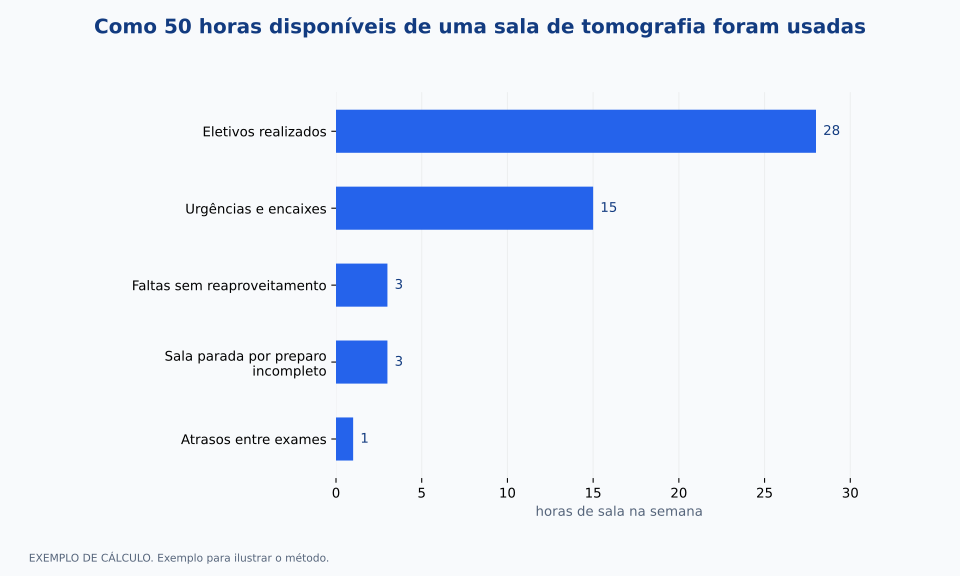
How 50 available hours in a CT room were used
Example of one week: elective exams completed, 28 h; urgent cases and add-ons, 15 h (30% of the 50 h, versus 20% planned); no-shows not backfilled, 3 h; room idle because of incomplete prep, 3 h; longer than expected gaps between exams, 1 h. Total: 50 h.
WORKED EXAMPLEExample to illustrate the method.
Comparison by room hours per weekChange the values to explore a scenario.
Compare the time held for add-ons with what actually happens
Any imaging schedule that serves the emergency department or inpatient units needs room for urgent cases. The problem shows up when the planned hold does not match reality. Take, as an example, a CT schedule that holds 20% of available hours for add-ons and urgent cases, while the records show urgent cases taking up 30%. The difference does not go away: it turns into elective exams that run late, get rescheduled, or are done on overtime.
The answer is not necessarily to raise the hold to the highest value observed. Look at the distribution by day of the week and time of day, because urgent cases tend to cluster in predictable periods. A larger hold at certain times and a smaller one at others can absorb the demand without blocking slots that would sit empty. Decisions about the clinical priority of each order remain with the responsible clinicians; the schedule design simply creates space that fits the observed pattern.
Treat no-shows and cancellations as measurable losses
A no-show is a direct loss of capacity when the slot is not backfilled. A study of more than 3.3 million outpatient radiology appointments at an academic institution in the United States, from 2000 to 2015, recorded 8.0% cancellations and 2.6% no-shows, with no-shows associated with factors such as income, travel distance, and weather. [3] Those percentages belong to that setting and should not be used as a benchmark for a Brazilian service.
The useful part is the method: measure no-shows and late cancellations separately, by modality, time slot, and booking lead time, and check how many of those slots were filled by another patient. Active confirmation, a same-day call list, and prep instructions sent well in advance are hypotheses to test. Before adopting overbooking, assess its effect on delays and on the experience of the patients who did show up.
Include patient prep and reporting in the flow, not just the room
An exam that cannot be performed because the patient arrived without fasting, without a required lab result, or without authorization uses up room time and produces nothing. Record the reason for every exam not performed, using fixed categories. If incomplete prep keeps recurring, the fix lies in patient instructions, advance checks, or communication with the ordering unit, not in the number of rooms.
From the ordering clinician's point of view, the service is done when the report is available. A study in an emergency department in the Netherlands broke total radiology department time into its components and, after Lean interventions that included a dedicated radiologist during peak hours, found the median total time fell from 70 to 36 minutes and the median report time from 37 to 11 minutes, with exam time essentially unchanged. [4] The takeaway for managers is that the delay was outside the room. Measuring scanner utilization alone would have hidden that step.
Worked example: where 50 hours of room time went
Picture a CT room with 60 operating hours per week and 50 available hours after maintenance, cleaning, and breaks. The schedule planned 40 hours of elective exams and 10 hours, or 20%, for add-ons and urgent cases. In the week observed, urgent cases and add-ons took up 15 hours, or 30% of available time: the 10 hours held, 4 hours taken from elective exams that were then rescheduled, and 1 hour of no-show time that was backfilled.
Of the 40 elective hours, 4 were displaced by urgent cases and 4 were no-shows, 3 of which sat idle. Another 3 hours of room time were lost to unprepared patients and 1 hour to longer than expected gaps between exams. That left 28 hours of completed elective exams. Adding 28 and 15, the room performed exams in 43 of its 50 hours, 86% of available time. The remaining 7 hours do not call for a new room; they call for rules on backfilling, patient prep, and turnaround between exams.
The chart shows this breakdown. The numbers illustrate the math and are not an industry benchmark. In practice, the same analysis should be repeated over several weeks before drawing any conclusion, because one atypical week skews the picture.
Build a short dictionary of capacity metrics
Each metric needs a formula, a source, a frequency, and an owner, so that two people reach the same number from the same records. The list below is a minimal proposal, to be adjusted to the systems you have. The full formulas and notes on interpretation are in the metrics section of this article.
Delivered room utilization: hours with a completed exam divided by available hours. Source: scheduling system and start and end time records. Frequency: weekly. Owner: imaging service manager.
Utilization by urgent cases and add-ons: urgent and add-on hours divided by available hours, compared with the planned hold. Source: schedule with order origin flagged. Frequency: weekly, by time slot. Owner: scheduling lead.
No-show rate: no-shows divided by confirmed scheduled exams. Source: schedule and front desk. Frequency: weekly, by modality. Owner: central scheduling.
Prep-related loss: room hours lost to exams not performed because of incomplete prep. Source: reason recorded in the room. Frequency: monthly. Owner: nursing or the technologist in charge of the shift.
Time to report: median time from end of exam to report sign-off, by modality and priority. Source: reporting system. Frequency: weekly. Owner: the service's medical director.
Test a scheduling change before buying a room
Pick one modality and one well-defined change: redistribute the urgent case hold by time slot, set up a call list for slots freed by no-shows, or check patient prep two days before the exam. Define the test period, the baseline, the metrics to track, and a balancing measure, such as wait time for urgent cases, to make sure an improvement in one place does not make things worse in another.
At the end, compare delivered hours, time to report, and wait time per exam against the baseline. If demand still exceeds delivered capacity even after losses come down, the case for expansion gets stronger, because it shows how much capacity is missing and at which step. This is an operational recommendation, not a promise of results; the outcome depends on the service, its demand, and local constraints.
FROM READING TO PRACTICE
Checklist to discuss with your team
Check off the items already in place. Use the rest as a working agenda.
WHAT TO TRACK
Clearly defined indicators
Delivered room utilization
100 × room hours with a completed exam / available room hours in the period, net of maintenance, cleaning, and scheduled breaks.
High utilization with a growing backlog suggests a real constraint; low utilization with a backlog points to schedule losses or a bottleneck outside the room. There is no universal target.
Utilization by urgent cases and add-ons
100 × hours used by urgent cases and add-ons / available hours, shown next to the planned hold for the same period and time slot.
The gap between planned and actual shows how much elective time was displaced. Flag the order origin at the time of scheduling.
No-show rate for scheduled exams
100 × patients who did not show up / exams scheduled in the period, by modality; cancellations with advance notice tracked as a separate series.
Track it alongside the share of backfilled slots, which shows how much of the no-show volume became an actual loss of capacity.
Time to report
Median time, in hours or minutes, from end of exam to report sign-off, by modality and priority.
Also show a high percentile, such as the 90th, to surface slow cases. Changes to the sign-off workflow will shift the series.
FREQUENTLY ASKED QUESTIONS
Questions about this topic
What is the ideal utilization rate for an imaging room?
This article does not set a universal target. The right level depends on the exam mix, urgent demand, and the slack needed to absorb variation. Set the target locally, together with wait time metrics.
Is overbooking worth it to make up for no-shows?
It can be a hypothesis, but only after measuring no-shows by modality and time slot. Overbooking without data increases delays for the patients who do show up. Test it over a defined period and track wait times.
Why include report time in a capacity analysis?
Because the ordering clinician can only act on the result. If reports are slow, adding rooms increases the number of exams waiting to be read without shortening the time to a decision. [4]
Sources and references
Primary sources used to produce this content. Implementation recommendations should be adapted and validated by each institution.
Breakdown of radiology time in the emergency department; median total time down from 70 to 36 minutes and report time from 37 to 11 minutes, with stable exam time.
Educational content on management and technology. It does not replace professional judgment, current regulations or clinical protocols.
We use browser storage to remember your choice and, if you accept, Umami to count visits in aggregate, without cookies and without identifying you. Nothing is used for advertising. Privacy Policy.